Optimized vs. unoptimized images: what actually changes
An unoptimized image is finished work nobody can read. The pixels are done, the photo looks right on the page, and to every machine that matters it may as well be blank: a filename like img_20240312.jpg and then silence. Optimizing it doesn't touch the picture. It rewrites every layer around the picture that a search crawler or an AI answer engine actually reads.
To keep this honest, the whole post hangs on one real image: the hero banner from comfora.rs, a furniture site I was auditing. It's a beige curved sofa lit by an oversized filament bulb. I ran it through Vizibly and recorded every field before and after, so nothing below is a hypothetical "imagine an image." It's one file, documented.

What does an unoptimized image actually look like?
It looks completely normal. That's the trap. On the page it renders fine, so it never shows up on anyone's to-do list. The problem is entirely in the layers you don't see.
Here's its metadata in WordPress, exactly as it shipped before I touched it:
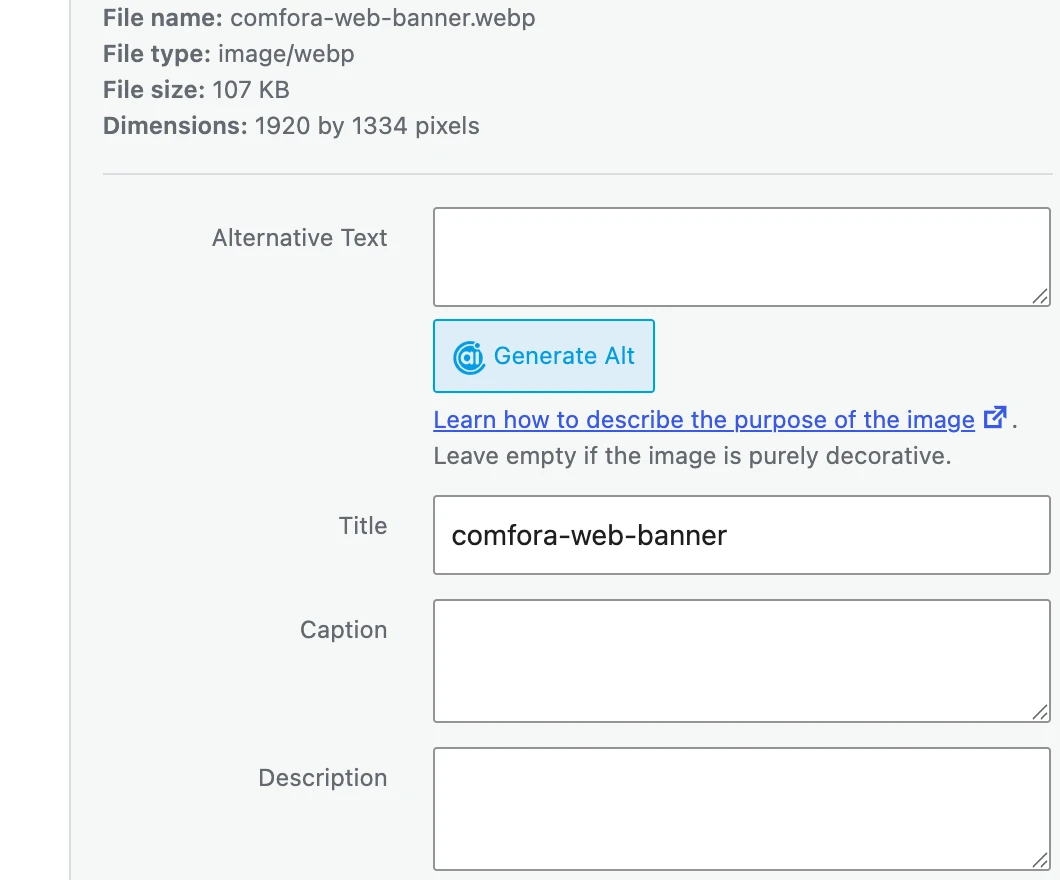
Take it apart and this is what a machine finds:
- Filename:
comfora-web-banner.webp. Not a camera dump likeimg_20240312.jpg, but "web-banner" still says nothing about what's in the picture (a sofa, a lamp, a brand). - Alt text: none. The Alternative Text field was empty. That's the single most-read field, left blank.
- Title:
comfora-web-banner. The CMS just reused the filename, so it adds nothing. - Caption: none.
- Structured data: none. No ImageObject block, so nothing labels the image explicitly.
- llms.txt entry: none.
- File: 107 KB WebP, 1920×1334. Already a modern format: not every unoptimized image is an oversized original, and this one wasn't. The gap here is entirely the missing text.
None of that is unusual. In WebAIM's 2026 survey of the top one million home pages, more than half shipped images with no alt text at all. The "before" state above is the web's default state.
What changes when you optimize
Optimization fills the empty layers. Vizibly generates 8 metadata fields per image across two tracks: an SEO track (what classic Google search reads) and a GEO track (what AI answer engines read). Below is each field for the real image: what it is, who actually reads it, and the before → after.
Filename. The URL slug of the file, and a signal Google names in its image best practices. Read by: the search crawler, plus any human scanning the URL.
Before: comfora-web-banner.webp → After: comfora-modern-beige-curved-sofa-pendant-light.
Alt text (SEO track). A short description of what the image shows and why it's on the page, capped at 125 characters. Read by: a person using a screen reader first, then the search crawler. Before: none → After: "Modern beige curved sofa with cushion illuminated by an oversized glowing filament bulb from Comfora".
Entity-rich alt (GEO track). A second, entity-dense description (up to 150 characters) that names the specific products, brands, or places in the image so an answer engine can connect it to a topic. Read by: AI answer engines. Before: none → After: "A beige curved Comfora sofa illuminated by an oversized Edison Light Bulb in a modern interior."
Title. A concise title attribute, up to 70 characters. Read by: the crawler, and browsers that surface it on hover.
Before: comfora-web-banner → After: "Comfora Modern Beige Curved Sofa with Pendant Light".
Caption. One or two sentences a reader would see beneath the image. Read by: the person on the page, and the crawler treating it as nearby context. Before: none → After: "A modern beige curved sofa from Comfora sits under the warm glow of an exposed filament light bulb."
Description. Two or three sentences of fuller context. Read by: the crawler and AI engines that want more than a one-line alt. Before: none → After: "A modern light beige sofa with a curved backrest and accent pillow is positioned against a dark background. An oversized illuminated filament light bulb hangs directly above the couch, casting a warm light over its fabric texture."
ImageObject structured data. A block of machine-readable JSON-LD that labels the image explicitly. ImageObject is the schema.org type built for exactly this. Read by: the search crawler (it can drive rich results) and AI engines that prefer structured input to guessing.
Before: none → After (the contentUrl is abbreviated here; the real value points at the optimized WebP):
{
  "@context": "https://schema.org",
  "@type": "ImageObject",
  "name": "Comfora Modern Beige Curved Sofa with Pendant Light",
  "caption": "A modern beige curved sofa from Comfora sits under the warm glow of an exposed filament light bulb.",
  "description": "A modern light beige sofa with a curved backrest and accent pillow is positioned against a dark background. An oversized illuminated filament light bulb hangs directly above the couch, casting a warm light over its fabric texture.",
  "keywords": "Comfora, Edison Light Bulb, Interior Design",
  "creator": { "@type": "Organization", "name": "Comfora" },
  "contentUrl": "https://…/optimized/comfora-modern-beige-curved-sofa-pendant-light.webp"
}
llms.txt entry. A plain-text block for llms.txt, an emerging convention: a file that hands AI systems a clean summary of a page's content. Adoption isn't universal yet, so treat it as a bet on direction. Read by: AI systems that read context files instead of crawling.
Before: none → After:
## comfora-modern-beige-curved-sofa-pendant-light
> A modern beige curved sofa from Comfora sits under the warm glow of an exposed filament light bulb.
> Entities: Comfora, Edison Light Bulb, Interior Design
> Q: What kind of lighting is featured above the modern Comfora sofa? A: An oversized exposed filament bulb hangs above the beige curved sofa, providing warm ambient lighting.
Same photo, eight fields that went from empty to filled. Vizibly reports SEO and GEO scores when it crawls a whole site, which is how I audited anthropic.com in the pillar post. On a single upload like this one there's no score to chase: the win is the eight fields themselves, present instead of blank.
Does any of this actually matter?
Fair question, and I'd rather point you at the evidence than repeat it. I made the full case in the pillar post; here's the short version with two pieces of it.
WebAIM's 2026 study of the top one million home pages (an accessibility survey, run by people with nothing to sell you in SEO) found more than half had images missing alternative text. The gap this post fixes is not a niche problem. It's the web's normal state. I walk through what that means for both search and AI in the pillar post on whether image SEO still matters.
The second piece is a case study: I crawled anthropic.com, the company behind Claude, and its images scored well below what you'd expect. The methodology and the exact numbers live in that same post's data section, so I won't restate them here. The takeaway is that even a top-tier site ships images like the "before" above, because the practice is that new.
The file size side
Everything above is metadata. Compression is the other half of optimization, and it's the one change with an immediate, mechanical payoff you can feel: the page loads faster, and slow pages lose both rankings and readers.
Converting to a modern format like WebP does most of the work. On one representative CMS-export image I measured a 52% reduction in file size. But be honest about the range: an already-optimized image saves almost nothing, while a raw, oversized original saves far more.
The Comfora image is the honest end of that range. It already shipped as a 107 KB WebP, so there was nothing meaningful to compress. That's worth saying plainly: for this file, the entire win was the metadata above, not the bytes. Compression matters when the original is heavy. When it isn't, the readable-text layer is the whole game.
What optimization can't do
Here's the line I won't cross, even though it would sell better. Filling these fields makes an image readable. It does not make it ranked, and it does not buy you a citation.
Metadata is the input a machine needs before it can consider your image at all. It's not a lever that guarantees an output. Nobody can promise you a Google ranking or a mention in ChatGPT's answer from any of this, because those systems don't publish the data that would let anyone measure it. I laid out that whole argument in the pillar post's section on what nobody can honestly promise.
So the honest frame is the one you can verify yourself: after optimization, your image has a descriptive filename, real alt text on both tracks, a valid ImageObject block, and (when the original was heavy) a smaller file. Every one of those is present or absent on your own site, today. That's what changes. The rest is up to the machines.
Run your own before/after
You don't have to trust my one example. Point Vizibly at your own site, pick any image, and watch the same fields fill in on a photo you know. The before/after is yours, on your file.